
Introduction
Modern websites are no longer static pages with only text and images. Users expect websites to respond instantly to their actions. This is where JavaScript becomes essential. Understanding how JavaScript handles user interaction helps developers create dynamic, responsive, and user-friendly web experiences.
Whenever a user clicks a button, types in a form, scrolls a page, or touches a screen, JavaScript works behind the scenes to detect and respond to that action. Without JavaScript, most interactive features on websites would not function properly.
What Is User Interaction in Web Development?
User interaction refers to any action a visitor performs on a website. These actions help the website understand what the user wants to do.
Common user interactions include:
- Clicking buttons or links
- Filling and submitting forms
- Typing using the keyboard
- Hovering with a mouse
- Swiping or tapping on mobile devices
JavaScript plays a major role in controlling these interactions. Learning how JavaScript handles user interaction is essential for building modern web applications.
Role of JavaScript in Handling User Interaction
HTML provides the structure of a webpage.
CSS controls the visual appearance.
JavaScript controls behavior and interaction.
JavaScript decides:
- What happens after a button click
- Whether form input is valid
- When to show error messages
- How content updates without reloading the page
This is why JavaScript is often described as the brain of a webpage. It transforms user actions into meaningful responses.
Understanding Events in JavaScript
In JavaScript, user actions are known as events. An event occurs when a user interacts with the webpage.
Some common JavaScript events include:
- Click events
- Keyboard events
- Mouse movement events
- Form submission events
- Page load events
To understand how JavaScript handles user interaction, it is important to understand how events work. When an event occurs, JavaScript captures it and executes specific instructions.
Event Listeners and Their Importance
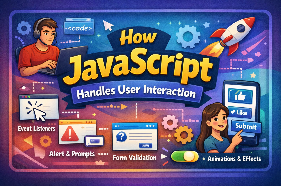
Event listeners allow JavaScript to wait for a specific event and respond when it happens.
An event listener connects:
- An HTML element
- A specific event
- A function that runs after the event
For example, when a user clicks a button, JavaScript listens for that click and performs an action. This mechanism is a core part of how JavaScript handles user interaction efficiently.
DOM Manipulation and User Interaction
JavaScript interacts with HTML through the Document Object Model (DOM). The DOM represents the structure of a webpage as objects that JavaScript can access and modify.
Using the DOM, JavaScript can:
- Change text content
- Update styles dynamically
- Add or remove elements
- Enable or disable buttons
DOM manipulation is essential for real-time interaction. It allows JavaScript to update the page instantly based on user behavior.
Handling Click Events with JavaScript
Click events are among the most frequently used interactions on websites.
When a user clicks an element:
- The browser detects the click
- JavaScript identifies the event
- The event listener activates
- A function executes
This process explains how JavaScript handles user interaction in menus, buttons, pop-ups, sliders, and navigation systems.
Keyboard Interaction in JavaScript
JavaScript also responds to keyboard actions. These interactions improve accessibility and usability.
Keyboard events are used in:
- Login forms
- Search bars
- Live input validation
- Shortcut keys
By managing keyboard input effectively, JavaScript ensures smooth and responsive user experiences across different devices.
Form Validation and User Input Handling
Forms are a critical part of user interaction. JavaScript helps validate user input before sending data to a server.
JavaScript can:
- Check for empty fields
- Validate email formats
- Ensure password strength
- Display instant error messages
This client-side validation reduces server load and improves user experience. It clearly demonstrates how JavaScript handles user interaction in real time.
Mouse and Touch Events
JavaScript supports both mouse and touch events, making it suitable for desktop and mobile platforms.
Mouse events handle:
- Hover effects
- Drag and drop
- Scroll detection
Touch events support:
- Swiping gestures
- Tapping actions
- Mobile-friendly navigation
These features show how JavaScript adapts to different devices and user behaviors.
Real-Time Feedback Using JavaScript
One of the biggest advantages of JavaScript is real-time feedback.
Examples include:
- Password strength indicators
- Live search suggestions
- Instant form validation
- Dynamic content loading
Real-time feedback improves usability and keeps users engaged. It is a key reason how JavaScript handles user interaction so effectively.
Why JavaScript Is Essential for Modern Websites
Modern users expect fast, responsive, and interactive websites. JavaScript fulfills these expectations by:
- Reducing page reloads
- Improving performance
- Enhancing user experience
- Enabling dynamic content
Understanding how JavaScript handles user interaction is essential for anyone involved in web development or digital content creation.
Conclusion
JavaScript is the foundation of interactive web experiences. From handling clicks and keyboard input to validating forms and providing real-time feedback, JavaScript manages every aspect of user interaction.
By learning how JavaScript handles user interaction, developers can create websites that are not only functional but also engaging and user-friendly. In today’s web ecosystem, JavaScript is not optional—it is essential.