
Introduction
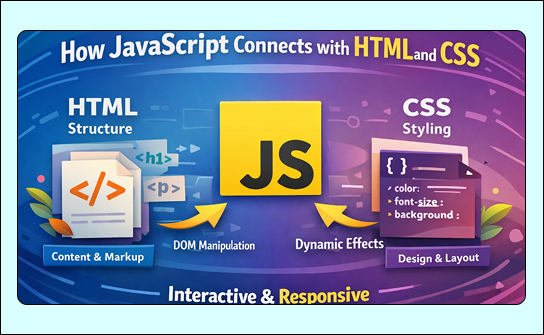
Web development is built on three core technologies: HTML, CSS, and JavaScript. HTML creates the structure of a webpage, CSS controls its appearance, and JavaScript brings everything to life. Understanding how JavaScript connects with HTML and CSS is essential for building modern, interactive, and dynamic websites.
Without JavaScript, websites would be static. Buttons would not respond, forms would not validate instantly, and animations would feel lifeless. JavaScript acts as the bridge that connects structure (HTML) and style (CSS) with behavior and logic.
This blog explains in detail how JavaScript works with HTML and CSS, how they communicate with each other, and why this connection is so powerful in modern web development.

Understanding the Role of HTML, CSS, and JavaScript
Before diving deeper, it’s important to understand what each technology does.
HTML (Structure)
HTML defines:
- Page layout
- Headings and paragraphs
- Images, links, and forms
It tells the browser what elements exist on the page.
CSS (Presentation)
CSS controls:
- Colors and fonts
- Spacing and alignment
- Layout and responsiveness
- Animations and transitions
It decides how things look.
JavaScript (Behavior)
JavaScript controls:
- User interaction
- Dynamic content
- Logic and conditions
- Real-time updates
This is why understanding how JavaScript connects with HTML and CSS is critical for full-stack or frontend developers.
How JavaScript Connects with HTML
JavaScript interacts with HTML through the Document Object Model (DOM). The DOM represents the webpage as a tree of objects that JavaScript can access and modify.
Accessing HTML Elements
JavaScript can select HTML elements using:
- IDs
- Classes
- Tags
Once selected, JavaScript can:
- Change text
- Update attributes
- Add or remove elements
- Respond to user actions
This direct connection allows JavaScript to control HTML content dynamically.
DOM Manipulation Explained Simply
DOM manipulation means changing the webpage after it has loaded.
JavaScript can:
- Update headings when a button is clicked
- Insert new content without refreshing the page
- Remove elements dynamically
This is one of the clearest examples of how JavaScript connects with HTML to create interactive experiences.
Handling Events Between JavaScript and HTML
HTML elements generate events when users interact with them.
Common events:
- Click
- Input
- Submit
- Mouseover
- Keypress
JavaScript listens to these events using event listeners and responds accordingly. This connection is what makes forms, buttons, and menus work properly.
How JavaScript Connects with CSS
JavaScript does not just work with HTML; it also interacts deeply with CSS.
Modifying Styles Dynamically
JavaScript can:
- Change colors
- Modify font sizes
- Show or hide elements
- Add animations
This allows real-time visual updates based on user behavior.
Example use cases:
- Dark mode toggle
- Button hover effects
- Error highlighting in forms
These features demonstrate how JavaScript connects with HTML and CSS to create responsive design.
Using CSS Classes with JavaScript
Instead of changing styles one by one, JavaScript often works with CSS classes.
JavaScript can:
- Add a class
- Remove a class
- Toggle a class
This approach is cleaner and more scalable, especially in large projects.
It also keeps design (CSS) and logic (JavaScript) properly separated.
JavaScript, HTML, and CSS in Real-World Interaction
Let’s understand this connection with a real-world example.
Example Scenario
A user clicks a button:
- HTML provides the button
- CSS styles the button
- JavaScript detects the click
- JavaScript updates HTML content
- JavaScript applies a CSS class for animation
This smooth cooperation explains how JavaScript connects with HTML and CSS seamlessly.
Form Handling with HTML, CSS, and JavaScript
Forms are a perfect example of this connection.
- HTML creates the form fields
- CSS styles the form
- JavaScript validates input and shows messages
JavaScript checks:
- Empty fields
- Invalid emails
- Password strength
CSS visually highlights errors, while HTML holds the structure. All three work together.
Dynamic Content Loading
JavaScript can load content without refreshing the page.
Examples:
- Load more buttons
- Infinite scrolling
- Live search results
HTML holds the container, CSS styles it, and JavaScript updates it dynamically. This is widely used in modern web applications.
Animations and Transitions
CSS handles animations smoothly, but JavaScript decides when they should happen.
JavaScript:
- Triggers animations
- Controls timing
- Responds to user input
This powerful combination improves user experience and engagement.
Why This Connection Is Important
Understanding how JavaScript connects with HTML and CSS helps developers:
- Build interactive websites
- Improve performance
- Create better user experiences
- Debug issues faster
Without this understanding, developers struggle to control behavior and styling efficiently.
Common Mistakes Beginners Make
Some common issues include:
- Trying to manipulate HTML before the page loads
- Writing CSS logic inside JavaScript unnecessarily
- Mixing structure, style, and logic in one place
Avoiding these mistakes makes code cleaner and more maintainable.
Best Practices for Using JavaScript with HTML and CSS
- Keep HTML clean and semantic
- Use CSS classes instead of inline styles
- Let JavaScript control behavior, not design
- Write readable and modular code
These practices help maintain a strong connection between all three technologies.
Real-World Applications
Almost every modern website uses this connection:
- E-commerce websites
- Social media platforms
- Dashboards
- Web apps
From simple buttons to complex interfaces, how JavaScript connects with HTML and CSS defines modern web development.
Conclusion
HTML, CSS, and JavaScript are incomplete without each other. HTML builds the structure, CSS creates the look, and JavaScript controls the behavior. Together, they create powerful and interactive web experiences.
Understanding how JavaScript connects with HTML and CSS is a fundamental skill for anyone learning web development. This knowledge allows developers to build faster, smarter, and more user-friendly websites.