

Introduction
In today’s digital world, almost everything we see on the internet is built using a few core technologies. One of the most important and basic among them is HTML. If you have ever opened a website, read an article online, watched something on a webpage, or clicked a button, you have interacted with HTML-even if you didn’t realize it.
This article is written especially for beginners. You do not need any technical background or coding experience. By the end of this blog, you will clearly understand what HTML is, why it is important, how it works, and how it helps create web pages.
What Is HTML?
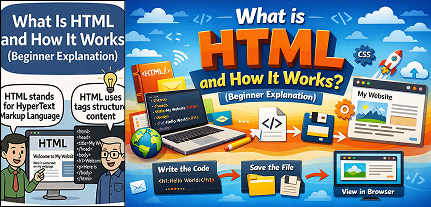
HTML stands for HyperText Markup Language.
HTML is not a programming language. Instead, it is a markup language, which means it is used to structure and organize content on the web. HTML tells a web browser what content to show and how that content is arranged on a webpage.
Think of HTML as the skeleton of a website. Just like a human body needs bones to give it shape, a website needs HTML to give it structure.
Without HTML:
- There would be no headings
- No paragraphs
- No images
- No buttons
- No links
- No forms
In short, HTML is the foundation of every website.

Why Is HTML Important?
HTML is important because it is the starting point of web development. Every website, whether simple or complex, begins with HTML.
Here are some key reasons why HTML is important:
- It creates the structure of a webpage
HTML defines where headings, text, images, videos, and other elements appear. - It is easy to learn
HTML is beginner-friendly and uses simple, readable tags. - It works on all browsers
Every web browser understands HTML. - It is required for other web technologies
CSS and JavaScript work on top of HTML. Without HTML, they have nothing to style or control. - It is future-proof
HTML has been evolving for years and will continue to be a core part of the web.
What Does “Markup Language” Mean?
A markup language uses tags to mark or label content.
These tags tell the browser:
- This is a heading
- This is a paragraph
- This is an image
- This is a link
HTML does not perform calculations or logic like programming languages do. Instead, it focuses only on presentation and structure.
How HTML Works (Step-by-Step)
To understand how HTML works, let’s break the process into simple steps.
Step 1: Writing HTML Code
HTML code is written using tags inside a text file.
This file is saved with a .html extension.
Example:index.html
Step 2: Opening the HTML File in a Browser
When you open the HTML file in a browser:
- The browser reads the HTML code
- It understands the tags
- It displays the content accordingly
You don’t need special software. Any browser can open an HTML file.
Step 3: Browser Interprets the Tags
The browser does not show the tags themselves.
Instead, it uses them as instructions.
For example:
- A heading tag is shown as big bold text
- A paragraph tag is shown as normal text
- An image tag shows an image
This is how HTML turns plain text into a visual webpage.
Basic Structure of an HTML Document
Every HTML page follows a basic structure. Even the simplest webpage has a standard layout.
An HTML document usually contains:
- Document type declaration – tells the browser this is an HTML document
- HTML tag – wraps the entire page
- Head section – contains information about the page
- Body section – contains visible content
The browser reads this structure from top to bottom.
What Are HTML Tags?
HTML tags are keywords enclosed in angle brackets.
Example:
<tag></tag>
Most tags come in pairs:
- Opening tag
- Closing tag
The opening tag starts an element.
The closing tag ends it.
Common HTML Tags Explained Simply
Let’s look at some commonly used HTML tags and what they do.
1. Heading Tags
HTML has six heading levels:
- h1 (largest)
- h2
- h3
- h4
- h5
- h6 (smallest)
They are used for titles and subtitles.
2. Paragraph Tag
The paragraph tag is used to write normal text content.
Each paragraph appears on a new line.
3. Image Tag
The image tag is used to display images on a webpage.
It tells the browser where the image is located and how to show it.
4. Link Tag
Links allow users to move from one page to another.
They are clickable text or images.
5. List Tags
HTML supports:
- Ordered lists (numbered)
- Unordered lists (bullet points)
Lists help organize content clearly.
6. Button Tag
Buttons allow users to interact with a webpage.
They are commonly used for forms, actions, and navigation.
Attributes in HTML
Attributes provide extra information about HTML elements.
They are written inside the opening tag.
For example:
- Image size
- Link destination
- Element identification
Attributes help customize how elements behave or appear.
What Is the Head Section?
The head section contains information that is not visible on the webpage but is important for the browser.
It may include:
- Page title
- Character encoding
- Page description
- Instructions for responsiveness
The title written in the head section appears on the browser tab.
What Is the Body Section?
The body section contains everything that users see on the webpage.
This includes:
- Text
- Images
- Videos
- Buttons
- Forms
- Lists
If it appears on the screen, it belongs in the body section.
HTML Is Static by Nature
HTML by itself creates static pages.
This means:
- Content does not change automatically
- No logic or calculations
- No dynamic behavior
For dynamic features, HTML works together with:
- CSS (for design)
- JavaScript (for interactivity)
But HTML is always the starting point.
HTML and Web Browsers
Web browsers are programs that read HTML code and render it visually.
Different browsers may look slightly different, but HTML ensures the structure remains consistent.
Browsers understand HTML because it follows global web standards.
Who Uses HTML?
HTML is used by:
- Web developers
- Designers
- Content creators
- Bloggers
- Students
- Digital marketers
- Website owners
Even people who don’t code deeply often use HTML for editing content or layouts.
Is HTML Hard to Learn?
No. HTML is considered one of the easiest technologies to learn.
Reasons:
- Simple syntax
- Readable tags
- Immediate visual results
- No complex logic
Most beginners can learn basic HTML in a few days.
What HTML Cannot Do
It is important to understand HTML’s limitations.
HTML cannot:
- Perform calculations
- Make decisions
- Handle databases
- Create animations alone
- Respond to user actions dynamically
For these tasks, other technologies are used alongside HTML.
Real-Life Example to Understand HTML
Imagine building a house:
- HTML is the structure and walls
- CSS is the paint, colors, and decoration
- JavaScript is the electricity, switches, and automation
Without the structure, nothing else can exist.
Future of HTML
HTML continues to evolve.
Modern versions support:
- Audio and video
- Forms and inputs
- Mobile-friendly design
- Better accessibility
Even as technology advances, HTML remains essential.
Final Thoughts
HTML is the foundation of the web.
Every website starts with it.
Every web developer learns it first.
If you are new to web development, HTML is the perfect place to begin. It teaches you how the web is structured and prepares you for more advanced technologies.
Learning HTML is not just about coding—it is about understanding how the internet works.
Once you understand HTML, the web starts to make sense.

Pingback: Basic Structure of an HTML Page (With Example)2 - litecodify.com
Pingback: Common HTML Mistakes Beginners Often Make 8 - litecodify.com
Pingback: CSS Selectors Explained with Simple Examples - litecodify.com
Pingback: Understanding the CSS Box Model for Beginners3 - litecodify.com