
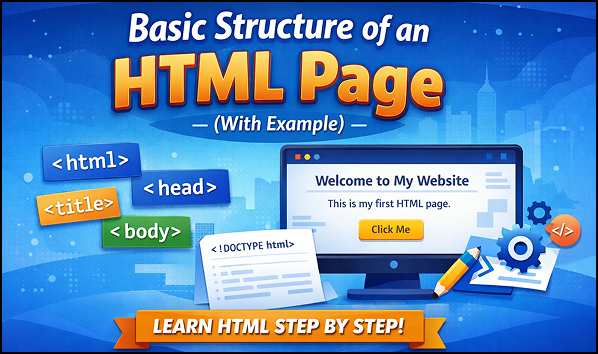

When someone starts learning web development, the first and most important concept they come across is the basic structure of an HTML page. Before adding colors, images, animations, or interactivity, it is necessary to understand how an HTML page is organized and how browsers read it.
This blog is written for complete beginners. If you have never written HTML before, don’t worry. By the end of this article, you will clearly understand what an HTML page structure is, why it matters, and how each part works together to create a webpage.
What Is the Structure of an HTML Page?
The structure of an HTML page refers to the basic layout and arrangement of HTML elements that form a webpage. Every HTML document follows a standard pattern so that web browsers can understand and display the content correctly.
Think of it like a book:Basic Structure of an HTML Page
- The cover tells what the book is about
- The index gives information
- The chapters contain the actual content
Similarly, an HTML page has defined sections that serve different purposes.
Basic HTML Page Example,Basic Structure of an HTML Page
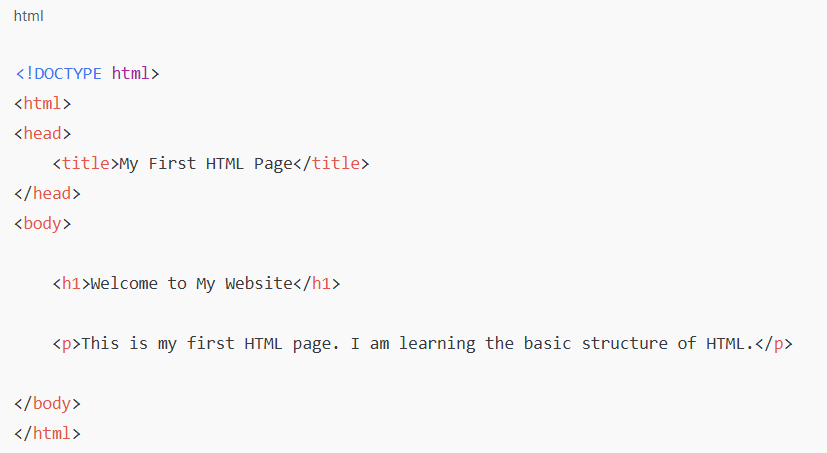
1. <!DOCTYPE html>
Explanation:
- Ye browser ko batata hai ki ye HTML5 document hai
- Browser ko sahi tarike se page render karne me madad karta hai
- Ye HTML tag nahi hota, sirf ek instruction hoti hai
Har HTML page me ye likhna zaroori hota hai
2. <html> Tag
Explanation:
- Ye root element hota hai
- Pura HTML page isi ke andar likha jata hai
- Ye batata hai ki webpage yahin se start hota hai
- Isse browser ko pata chalta hai ki webpage yahin end ho raha hai
3. <head> Section
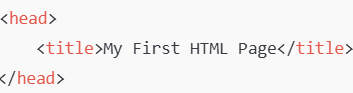
Explanation:
- Head section me page ki information hoti hai
- Jo cheezein user ko directly nahi dikhti
- Browser aur search engines ke liye hoti hain
<title> Tag
<title>My First HTML Page<title>
Explanation:
- Ye browser tab me dikhne wala page title hota hai
- Ye SEO aur user experience ke liye important hota hai
- Page ke content ka idea deta hai
Note: Title page par text ke roop me nahi dikhta
4. <body> Section
Explanation:
- Body section me jo kuch bhi user screen par dekhta hai, wo hota hai
- Text, images, buttons, links sab body ke andar hote hain
5. <h1> Heading Tag
. <h1>Welcome to My Website. <h1>
Explanation:
- Ye main heading (H1) hoti hai
- Page ka sabse important heading
- Usually ek page me sirf ek H1 hoti hai
6. <p> Paragraph Tag
https://web.dev/learn/html/document-structure<p>This is my first HTML page. I am learning the basic structure of HTML. <p>
Explanation:
Content ko readable banata hai
Paragraph tag normal text likhne ke liye hota hai
Har paragraph new line me show hota hai
HTML Structure Ka Flow
Browser HTML ko is order me padhta hai:
- DOCTYPE check karta hai
-
<html>tag ko samajhta hai - Head section ki information leta hai
- Body ka content screen par dikhata hai
Real-Life Example Se Samjho
- HTML page ko ek school notebook samjho:
<!DOCTYPE>→ Notebook ka type<html>→ Poori notebook<head>→ First page (details)<title>→ Notebook ka naam<body>→ Andar likha actual content<h1>→ Chapter heading<p>→ Chapter ka text
Why Is HTML Page Structure Important?
Understanding the structure of an HTML page is important because:
- Browsers depend on it to render content properly
- It helps keep code clean and organized
- It improves readability for developers
- It supports accessibility and responsiveness
- It is the foundation for CSS and JavaScript
Without proper structure, a webpage may still load, but it will be messy, confusing, and hard to manage.
The Basic Parts of an HTML Page
An HTML page is mainly divided into the following parts:
- Document Type Declaration
- HTML Element
- Head Section
- Body Section
Each part has a specific role.
1. Document Type Declaration (DOCTYPE)
The document type declaration appears at the very top of an HTML page. It tells the browser which version of HTML is being used.
This line is not an HTML tag. It is an instruction for the browser so it can display the page correctly.
Why DOCTYPE is important:
- Prevents browser errors
- Ensures modern standards are followed
- Helps avoid layout issues
Even though users never see it, the browser needs it.
2. The HTML Element
The <html> element is the root element of the webpage. This means all other elements are placed inside it.
It acts like a container that holds:
- The head section
- The body section
Without the HTML element, the browser would not know where the webpage starts and ends.
3. The Head Section Explained
The <head> section contains information about the webpage, not the content shown to users.
This section helps browsers, search engines, and devices understand the page better.
What Goes Inside the Head Section?
Common elements inside the head section include:
- Page title
- Character encoding
- Page description
- Viewport settings
These elements improve usability and performance.
Page Title
The title defines the name of the webpage that appears on the browser tab.
It is important because:
- It helps users identify the page
- It improves search visibility
- It gives context to the content
Even though the title is not visible on the page itself, it plays a major role behind the scenes.
Meta Information
Meta elements provide extra details about the page, such as:
- Language encoding
- Page behavior on different devices
- Content description
These details help browsers display content correctly on desktops, tablets, and mobile phones.
4. The Body Section Explained
The <body> section contains everything that users can see on the webpage.
This is the most important part of an HTML page from a user’s point of view.
What Goes Inside the Body Section?
The body can include:
- Headings
- Paragraphs
- Images
- Links
- Buttons
- Lists
- Forms
- Videos
If an element appears on the screen, it belongs inside the body.
Headings in HTML Structure
Headings define the content hierarchy of a page.
There are six levels of headings:
- H1 (main heading)
- H2 to H6 (subheadings)
Proper heading structure:
- Improves readability
- Helps screen readers
- Makes content easier to scan
- Organizes information logically
Each page should usually have one main H1 heading.
Paragraphs and Text Content
Paragraphs are used to display normal text.
They help:
- Break content into readable sections
- Improve visual clarity
- Present information clearly
Without paragraphs, text would look crowded and difficult to read.
Images in the HTML Structure
Images make webpages visually attractive and engaging.
When images are added properly:
- Content becomes easier to understand
- User interest increases
- Pages feel more professional
Images are always placed inside the body section.
Links and Navigation Elements
Links allow users to:
- Move between pages
- Access different sections
- Explore related content
They are essential for navigation and user experience.
Lists for Better Organization
Lists are used to present information in an organized way.
HTML supports:
- Ordered lists (numbered)
- Unordered lists (bullets)
Lists are helpful when explaining steps, features, or grouped items.
How Browsers Read an HTML Page
Browsers read HTML pages from top to bottom.
The process looks like this:
- Read DOCTYPE
- Understand HTML structure
- Process head information
- Render body content visually
If the structure is correct, the browser displays the page smoothly.
Common Mistakes Beginners Make
Many beginners make small mistakes while learning HTML structure:
- Forgetting the DOCTYPE
- Placing content inside the head section
- Skipping closing tags
- Using multiple H1 headings
- Writing everything without structure
Learning the correct structure early avoids these problems.
HTML Structure and Accessibility
A well-structured HTML page improves accessibility.
Benefits include:Basic Structure of an HTML Page
- Screen readers work better
- Content is easier to navigate
- Visually impaired users get better support
Semantic structure is important for inclusive design.
Relationship Between HTML, CSS, and JavaScript
HTML structure is the base layer.
- HTML provides structure
- CSS adds design and layout
- JavaScript adds interactivity
Without proper HTML structure, CSS and JavaScript cannot work effectively.
Real-Life Example of HTML Structure
Imagine a newspaper:
- The title is the main heading
- Sections have subheadings
- Articles are paragraphs
- Images support the text
HTML structure works in the same logical way.
Why Every Beginner Should Master HTML Structure
Mastering HTML structure helps you:Basic Structure of an HTML Page
- Write clean code
- Learn CSS faster
- Understand JavaScript better
- Build professional websites
- Avoid confusion later
It is the foundation of everything in web development.
Final Thoughts
The basic structure of an HTML page is simple but extremely powerful. It gives shape to the web and allows browsers to understand content correctly.Basic Structure of an HTML Page
Before learning advanced web technologies, every beginner should spend time understanding HTML structure. Once this foundation is strong, learning design and interactivity becomes much easier.
HTML is not just code-it is the language that organizes the internet.Basic Structure of an HTML Page

Pingback: Common HTML Tags Every Beginner Should Know3 - litecodify.com