
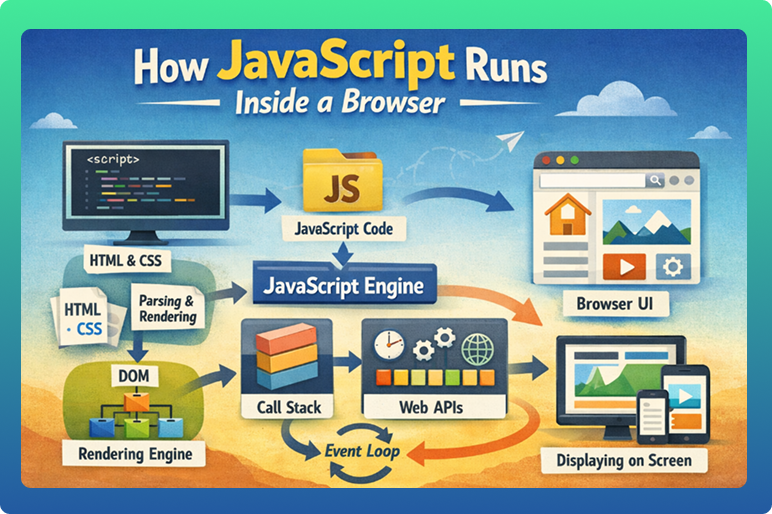

To understand JavaScript properly, it is important to know how JavaScript runs inside a browser. Many beginners think JavaScript magically works when a page loads, but in reality, there is a clear process happening behind the scenes. Browsers are specially designed to read, understand, and execute JavaScript efficiently.
Let’s break this process down in a simple and easy-to-understand way.
The Role of the Browser in JavaScript Execution
A browser is more than just a tool to display websites. It acts like a runtime environment for JavaScript. This means the browser provides everything JavaScript needs to run, such as:
- A JavaScript engine
- Memory management
- Access to web APIs
- Event handling system
Popular browsers like Chrome, Firefox, Edge, and Safari each have their own JavaScript engines that execute code at high speed. How JavaScript Runs Inside a Browser
What Is a JavaScript Engine?
A JavaScript engine is a program inside the browser that reads and executes JavaScript code.
Its main responsibilities are:
- Understanding JavaScript syntax
- Converting code into machine instructions
- Running the code efficiently
Each browser has its own engine:
- Chrome uses a fast engine
- Firefox uses a different optimized engine
- Safari has its own engine as well
Even though engines are different, JavaScript behaves almost the same across browsers.
Step 1: Loading the Web Page
When a user opens a website, the browser starts loading files in this order:
- HTML file
- CSS files
- JavaScript files
As the browser reads the HTML, it encounters JavaScript code either:
- Inside the HTML file, or
- Linked as an external file
At this stage, the browser prepares to process the JavaScript.
Step 2: Parsing the JavaScript Code
Parsing means reading and understanding the code.
The JavaScript engine:
- Reads the code line by line
- Checks for syntax errors
- Builds an internal structure
If there is a syntax error, JavaScript stops running and How JavaScript Runs Inside a Browser shows an error in the browser console.
Step 3: Compilation and Execution
Modern browsers use a smart technique called Just-In-Time (JIT) compilation.
This means:
- JavaScript code is compiled while it is running
- Frequently used code is optimized
- Performance improves automatically
After compilation, the browser executes the code and produces results such as:
- Updating content
- Responding to clicks
- Running animations
JavaScript and the DOM
The DOM (Document Object Model) is a structured representation of the webpage.
JavaScript interacts with the DOM to:How JavaScript Runs Inside a Browser
- Change text
- Modify styles
- Add or remove elements
- React to user actions
When JavaScript changes the DOM, the browser immediately updates what the user sees on the screen.
How Events Trigger JavaScript
JavaScript is mostly event-driven, meaning it runs when something happens.
Common events include:
- Clicking a button
- Typing in an input field
- Scrolling the page
- Hovering with the mouse
The browser listens for these events and runs the connected JavaScript code when they occur.
The JavaScript Call Stack
The call stack is a mechanism that keeps track of which function is currently running.
It works like a stack of plates:How JavaScript Runs Inside a Browser.
- A function is added when called
- It is removed when finished
This helps the browser execute JavaScript in the correct order.
Single-Threaded Nature of JavaScript
JavaScript runs in a single thread, which means:
- One task is executed at a time
- Tasks are processed in order
This makes JavaScript predictable and easier to manage, but it also means long tasks can block the page if not handled properly.How JavaScript Runs Inside a Browser .
The Event Loop Explained Simply
To handle multiple tasks efficiently, browsers use something called the event loop.
The event loop:
- Monitors the call stack
- Executes tasks when the stack is empty
- Manages background operations
This allows JavaScript to handle:
- Timers
- User interactions
- Background tasks
without freezing the webpage.How JavaScript Runs Inside a Browser 2026
Synchronous vs Asynchronous JavaScript
Synchronous code runs step by step and blocks execution until finished.
Asynchronous code allows JavaScript to:
- Start a task
- Continue other work
- Come back when the task is done
Examples of asynchronous operations:
- Fetching data
- Waiting for user input
- Timers and delays
This makes websites faster and more responsive.
Browser APIs and JavaScript
Browsers provide extra features called Web APIs that JavaScript can use.
These include:
- Timers
- Network requests
- Storage access
- Media handling
JavaScript uses these APIs to perform advanced tasks beyond basic logic.
Memory Management in JavaScript
The browser automatically manages memory for JavaScript.
This includes:
- Allocating memory for variables
- Cleaning unused memory
- Preventing memory leaks
This automatic system helps developers focus on writing logic instead of managing memory manually.
How JavaScript Updates the Screen
When JavaScript changes something on the page:
- The DOM is updated
- Styles are recalculated
- The page is repainted
This process happens very fast, making JavaScript interactions feel instant.
Why Understanding Browser Execution Matters
Knowing how JavaScript runs inside a browser helps developers:
- Write efficient code
- Avoid performance issues
- Debug errors easily
- Improve user experience
It also explains why certain actions behave the way they do.
Common Misunderstandings About JavaScript Execution
Some beginners believe:
- JavaScript runs all code at once
- JavaScript is always slow
- JavaScript blocks everything
In reality:
- JavaScript follows a structured execution process
- Modern engines are highly optimized
- Asynchronous handling prevents blocking
How JavaScript Handles Page Rendering
When JavaScript runs inside a browser, it plays an important role in how the page is displayed on the screen. Whenever JavaScript changes content or styles, the browser needs to update what the user sees. This process involves rendering.
Rendering happens in steps:
- The browser updates the DOM
- Styles are recalculated
- The layout is adjusted
- The page is repainted
Efficient JavaScript code ensures that these steps happen smoothly, without visible lag or flickering.How JavaScript Runs Inside a Browser
Blocking vs Non-Blocking JavaScript
One important concept in browser execution is blocking behavior.
Blocking JavaScript means:
- The browser must wait
- Page rendering pauses
- User interaction is delayed
Non-blocking JavaScript allows:
- Page content to load first
- Scripts to run in the background
- Better performance
Understanding this difference helps developers write faster and more user-friendly websites.
How JavaScript Interacts with HTML and CSS
JavaScript does not work alone. It constantly interacts with HTML and CSS.
Through browser mechanisms, JavaScript can:
- Read HTML elements
- Change text and attributes
- Modify CSS styles dynamically
- Add or remove elements
This interaction allows JavaScript to How JavaScript Runs Inside a Browser control both structure and presentation after the page has loaded.
JavaScript Execution Order in the Browser
JavaScript follows a specific execution order.
Generally:
- Code runs from top to bottom
- Functions execute when called
- Events trigger code later
If multiple scripts exist, the browser executes them in the order they are loaded, unless instructed otherwise. Understanding execution order helps prevent unexpected behavior.
Delayed Execution in JavaScript
Not all JavaScript runs immediately. Some code runs later based on conditions.
Examples include:
- Waiting for user interaction
- Delaying execution with timers
- Running code after content loads
Delayed execution helps avoid unnecessary processing and improves page performance.
Browser Console and JavaScript Execution
The browser console is a powerful tool for understanding how JavaScript runs.
Developers use it to:How JavaScript Runs Inside a Browser 2026
- View errors
- Track execution flow
- Test small code snippets
- Debug problems
The console provides insights into what happens when JavaScript executes inside the browser.
How Browsers Optimize JavaScript Execution
Modern browsers continuously optimize JavaScript performance.
They do this by:
- Optimizing frequently used code
- Removing unused operations
- Improving memory usage
This optimization happens automatically and helps JavaScript run faster over time.
Impact of Heavy JavaScript on Browsers
While JavaScript is powerful, excessive or poorly written code can slow down browsers.
Possible issues include:
- Slower page load
- Unresponsive UI
- High memory usage
That’s why understanding browser execution helps developers write cleaner and more efficient JavaScript.
JavaScript Execution and User Interaction
User interaction is closely connected to JavaScript execution.
When users:
- Click buttons
- Scroll pages
- Type text
JavaScript responds instantly through event handling. This immediate execution creates a smooth and interactive experience.
Why Execution Knowledge Improves Code Quality
Developers who understand how JavaScript runs inside a browser:
- Write cleaner code
- Avoid performance bottlenecks
- Reduce bugs
- Improve user experience
This knowledge leads to professional-quality websites.
Final Thoughts
JavaScript does not run randomly inside a browser. It follows a clear, well-organized execution process managed by the browser and its JavaScript engine. From loading the page to handling events and updating content, every step is carefully optimized for performance.
Understanding how JavaScript runs inside a browser gives you a deeper appreciation of how modern websites work and helps you write better, faster, and more reliable code.